If you want to check to make sure the email invites were sent to your group members, you can log into your account and click Messages from the left side of your account page. Click the Sent tab to view messages sent from your account in the past 30 days.
Click the stats icon on the right side of any row to view message details and analytics for that specific message.
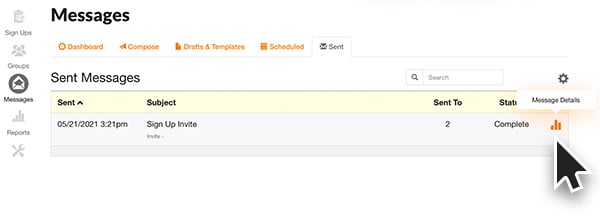
Under Message Details you can view the email text that was sent. Click Message Analytics to view the list of email addresses to whom the invite was sent and check for any emails that were not delivered. If you are a Gold, Platinum or Enterprise subscriber, you can see which invitees opened your email and clicked the sign up link.
Select the column heading for Status to sort the emails by "Bounced" or "Delivered."
Having Trouble?
Email can be extremely frustrating these days... particularly for a site like ours. Even though we only send legitimate emails that people want, sometimes virus software and server firewalls still block our emails because of over-aggressive protection. Here is what you should do:
- Verify that you have the correct email addresses in your group. To do this, login to the site and click on "My Groups" from the right hand navigation on the "My Account" page.
- Have your users check and see if the message was accidentally diverted into their JUNK email folder. Most email programs will let you "white list" an email address so that it won't get sent to JUNK. All our emails come from either "support" or "info" at the web address of our site.
- Check and see if all the emails you are having problem with are from the same source. For example, if everyone that is not receiving the email is from a specific company... then that company may be blocking our emails with an over-aggressive firewall. You can then put in a request to the IT department to make sure that SignUpGenius.com emails are allowed through.
- If you need further help, fill out the tech support form and tell us the emails that seem to be having the problem so that we can investigate it.