We offer the option to duplicate sign ups so you can easily reuse sign ups created for similar events.
-
From your account Sign Ups page, click the Created tab. If you do not see the sign up, click the filter and select Past from the drop down menu. You should then see all sign ups associated with the account.
-
Click the ellipsis icon (…) and select Duplicate
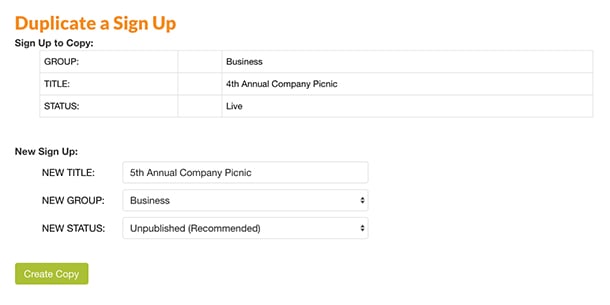
- Click Duplicate to proceed to the next step where you can create a copy of the sign up.
- Enter a new title and assign the sign up to a new group if needed.
- Click the Create Copy button to complete the duplication.
Finding Your Duplicate Sign Up
- Return to your account Sign Ups page to see the unpublished version of the sign up located under the Created tab.
- If you do not see the sign up, click the filter and select Drafts from the drop down menu.
- To edit your duplicate, click the ellipsis icon (…) to the bottom right of the sign up and choose Edit. This allows you to change dates, times, or other relevant information before publishing the new version of your sign up.