Need to control when people can sign up or make changes? We offer two advanced features that will give you the power to prevent last minute sign ups and cancellations. Sign Up Locking and Start/Stop Dates help you prevent last-minute sign-ups, lock changes before an event, or set an exact window for registration. These tools are great for things like volunteer shifts, scheduling appointments, or managing event registrations.
How It Works for Participants
- Sign Up Locking: If you’ve locked a sign-up, participants won’t be able to register or edit their entries once the deadline has passed.
-
Start/Stop Dates:
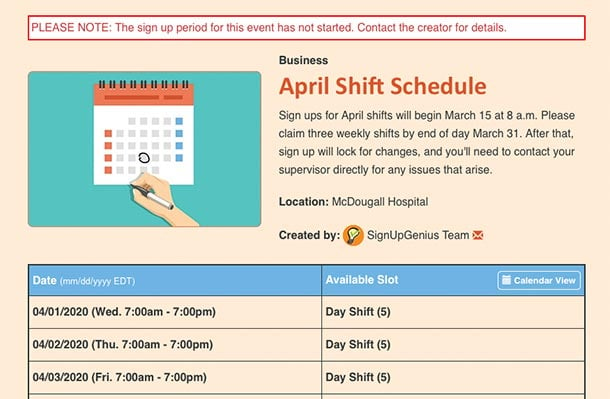
- Before the start date – Participants can see the sign-up but won’t be able to register yet.
- After the stop date – The sign-up will close automatically, and participants won’t be able to make changes.
Available for Premium Users
- Sign Up Locking is available with all paid SignUpGenius plans.
- Start/Stop Dates are available to Gold, Platinum, and Enterprise subscribers.
Sign Up Locking
Sign up locking is available with all paid subscriptions. Using this advanced feature, you can prevent participants from signing up, editing or deleting items based on the date.
Log into your account and view your Created sign ups. Click the ellipsis icon (displayed as •••) next to the sign up and select Edit.
- From the Settings tab, scroll down to the Preferences heading.
- Click the Restrictions tab.
- Click the + symbol next to Sign Up Locking.
You can use one or both of the locking options available:
- Prevent users from signing up a specified amount of time before the event. The minimum setting is 24 hours, meaning if your event is at 3:00 PM, sign-ups will lock at 3:00 PM the day before.
- Prevent editing or deleting of items a specified number of days prior to the date they signed up for. This prevents participants from editing or deleting their sign up at the last minute. The minimum setting is 24 hours.
Sign Up Start/Stop Dates
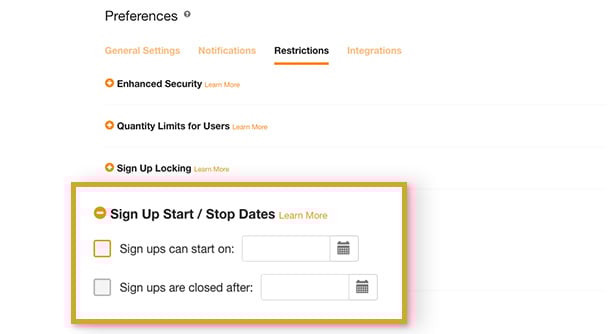
Gold, Platinum, and Enterprise subscribers can set automatic start and stop times for a sign-up. These times work on a 24-hour clock, meaning if you set a stop time for 5:00 PM, sign-ups will close exactly at 5:00 PM, not at the start of the calendar day. This feature can be used to specify the date and time a sign up is available to group members. Using this feature will allow you to invite your group, but name a future date/time when participants can begin signing up.
Log in to your account and view your Created sign ups. Click the ellipsis icon (displayed as •••) next to the sign up and select Edit.
- From the Settings tab, scroll down to the Preferences heading.
- Click the Restrictions tab.
- Click the + symbol next to Sign Up Start / Stop Dates.
For added customization, you can:
- Hide sign up dates, times and slots before the sign up opens or after it closes.
- Edit your sign up description to display a custom message before it opens and/or after it closes.
- Lock the sign up to prevent participants from making changes after the sign up has closed.
To learn more about the start and stop feature, check out this blog post or visit our pricing page.